> For the complete documentation index, see [llms.txt](https://docs.silverband.com.au/home/llms.txt). Markdown versions of documentation pages are available by appending `.md` to page URLs; this page is available as [Markdown](https://docs.silverband.com.au/home/paradigm-knowledge-base/sending-communications/workflows/manage-sending-email-and-sms-communications/sending-communications-using-the-cc-and-bcc-recipients.md).
# Sending Communications using the CC and BCC Recipients
Paradigm's CC and BCC recipients feature enables including additional recipients in your communications. By utilising the CC (Carbon Copy) field, you can include individuals who are relevant to the conversation and should be informed about the discussion. On the other hand, the BCC (Blind Carbon Copy) field allows you to discreetly include recipients without revealing their identities to other participants. This versatile feature offers enhanced flexibility and efficiency in communication within the Paradigm platform.
To help you make the most of this powerful feature, we have prepared a step-by-step workflow that provides detailed instructions on how to utilise the CC and BCC recipients option effectively. This workflow will guide you through the process, ensuring seamless integration of this feature into your communication practices. Please refer to the following steps:
## Add Providers, Agents, and Contacts to the List
For the Providers and Contacts record to be included in the list to be selected as CC or BCC recipients, please take note of the following:
* The Provider, Agent, or Contact record in the system must have their **email address** entered
* The Provider or Agent record must have the "**Communication Sender**" as one of its assigned roles, *see* [Assign Roles to a Provider Record](/home/paradigm-knowledge-base/providers-and-contacts/workflows/provider/assign-roles-to-a-provider-record.md) or [Add New Communication Sender](/home/paradigm-knowledge-base/sending-communications/workflows/manage-sending-email-and-sms-communications/add-new-communication-sender.md). For Agents, load their record via the **Agents** menu and [assign the role](/home/paradigm-knowledge-base/providers-and-contacts/workflows/agents/manage-agent-record.md#assign-roles-to-an-agent-record).
* The Contact record must have the "**Communication event recipient**" role assigned, *see* [Assign Roles to a Contact](/home/paradigm-knowledge-base/providers-and-contacts/workflows/contacts/assign-roles-to-a-contact.md)
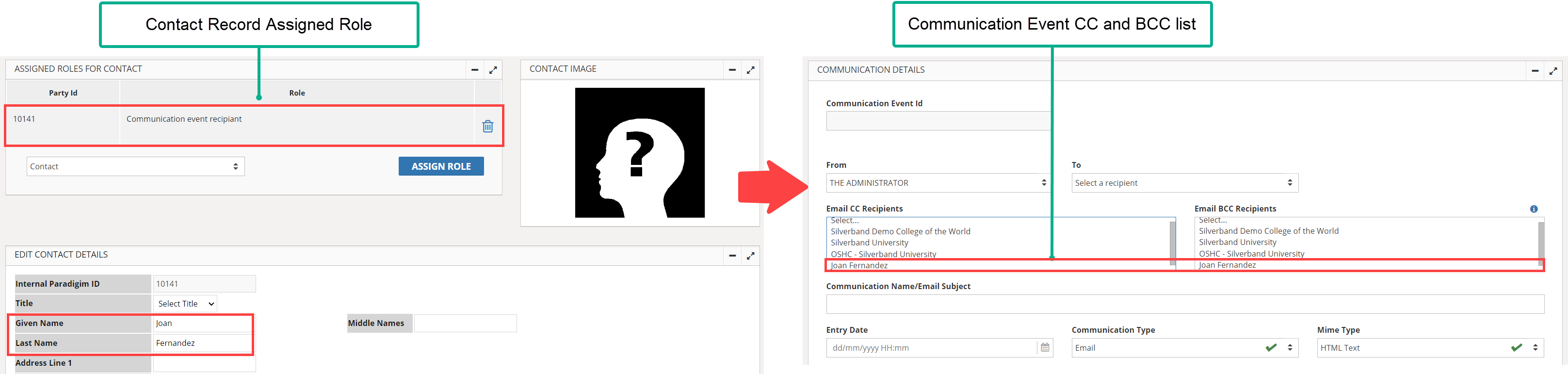
In the example below, a Contact named Joan Fernandez is assigned a "Communication event recipient" role and she now appears in the Communication Event CC and BCC Recipients.
assigning a role to a Contact record
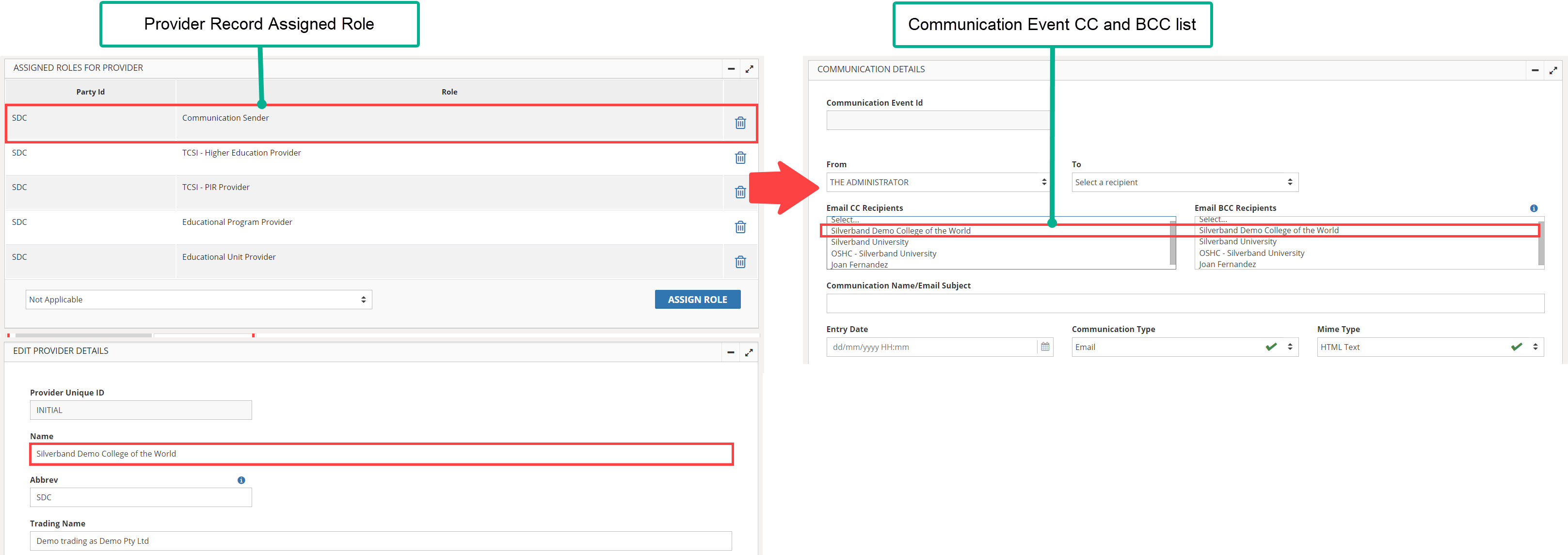
In another example below, a Provider called "Silverband Demo College of the World" is assigned a "Communication Sender" role and it now appears in the Communication Event CC and BCC Recipients.
assigning a role to a Provider record
## Related Workflows
After you have finalised your CC and BCC recipients, you can now refer to the following workflows and start sending communications using the new feature.
* [Send Individual Communication without Attachment](/home/paradigm-knowledge-base/sending-communications/workflows/manage-sending-email-and-sms-communications/send-individual-communication-without-attachment.md)
* [Send Individual Communication with Attachments](/home/paradigm-knowledge-base/sending-communications/workflows/manage-sending-email-and-sms-communications/send-individual-communication-with-attachment.md)
* [Send Bulk Communications without Attachment](/home/paradigm-knowledge-base/sending-communications/workflows/manage-sending-email-and-sms-communications/send-bulk-communications-without-attachment.md)
* [Send Bulk Communications with Attachments](/home/paradigm-knowledge-base/sending-communications/workflows/manage-sending-email-and-sms-communications/send-bulk-communications-with-attachment.md)